Showing posts with label digital citizenship. Show all posts

Thursday, May 2, 2019

National PTA + Google Be Internet Awesome Grant!


My PTA is super rad. They're very involved (in all the right ways!), and are willing to go along with ideas that teachers come up with. For example, last year PTA painted the basement hallway outside my room with green paint for doing green screen video projects! 

So I guess I shouldn't have been surprised that my PTA jumped on it when I saw a grant opportunity posted by National PTA and Google, and I asked the PTA to apply. Right before winter break, we received notification that we had won! With this grant, we were awarded funds to host a parent night to facilitate discussions about internet safety and digital citizenship. 

The PTA was beyond helpful in setting the event up, organizing the event, and getting supplies together for hosting. I volunteered to host by facilitating the main presentation. You'd be surprised how different it feels to present to a group of parents as opposed to a group of 6-8 graders! 

We had an awesome group of facilitators for our small groups, comprised of both teachers and parents:


We spent some of the money on snacks and fun swag for the evening, like pens, notepads, and webcam covers! We even designed our own special "Be Internet Awesome" logo for the night. 


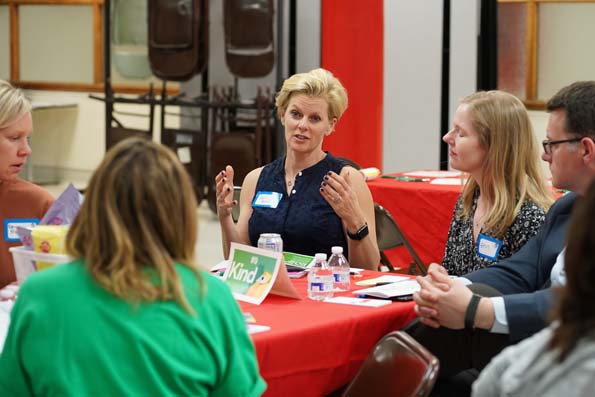
One of our dads came and photographed the evening's events, and the results were amazing! Check out some of the shots here:


Although I was nervous about presenting, I think I got a lot better as the night went on! After our large-group presentation, we split into our smaller groups and had discussions about various aspects of digital citizenship. Each group created a poster, and then presented to the whole group:


I learned so much from this event, and I'm grateful to National PTA and Google for giving us this opportunity! I can totally see us hosting these events at all of our district schools in the upcoming years., and I'd love to help other teachers host these events at their own schools!

Do I look like I know what I'm doing? (I hope so!)

We use the Be Internet Awesome curriculum in our school at the 6th grade level. In 7th and 8th grades, we also use parts of the curriculum from Common Sense Media and EVERFI Ignition courses.

How do you teach digital citizenship and internet safety at your school? 

- Mrs L.

Thursday, October 27, 2016

Chromebook How-To: Reverse Image Search


Have you ever watched an episode of the TV show Catfish? Each episode details the story of a person who thinks that they have found love online. Over time, they begin to have doubts as to whether or not the person they're talking to is who they really say they are. The results of each show vary, but the investigation pretty much always starts out the same: with a reverse image search!

Knowing how to do a reverse image search is the first step towards identifying fake profiles on social media. I made a video directed specifically demonstrating the different ways to do this on a Chromebook:


Out of all the options, I think that my favorite way to do the reverse search is the simple "right click" method in Chrome! All you have to do is right-click the image, and select "Search Google for Image!" Ridiculously simple!

My 8th graders watch an episode of Catfish as part of our digital citizenship and internet safety unit. We have several essential questions to ponder:
  • How does the anonymity of the Internet allow you to be someone other than yourself? 
  • Do you ever find yourself doing this to any extent? 
  • How would you feel in the shoes of this show's victim? Of the guilty party?

Our lesson ends with going over some tips for spotting a catfish, and about how to take some steps to try and keep our information private. We then try out reverse image search, so we have some strategies for doing our own Catfish-style investigating when communicating online!

What are your favorite tips and tricks for catching a catfish? Do you have any catfish stories of your own?

-Mrs. L.


Tuesday, September 6, 2016

Digital Citizenship Similes: An Unplugged Activity

I like to use lessons from Common Sense Media's library of lessons when I teach internet safety and digital citizenship because I find them to be pretty relevant and engaging for students at the middle school level. One of the lessons I'm using this year is called Digital Life 101. One of the activities I've modified from this lesson for my classroom is the simile activity where students finish the sentence, "My digital media life is like…"

We do this activity using our wipe-off tabletops, which I talked about earlier this year in a blog post. The kids really enjoyed getting to write on the tables which isn't something that you normally get to do in school! I even let students draw little symbols or pictures to go along with their response if they wanted. 

If time allows, I will have students share out their answers with the class and discuss the meaning behind their simile. In this particular case last week, we had run out of class time, so I told students to leave the writing on the table as an exit slip activity for the class. After the students left, I walked around and photographed each students answer. I then turned the responses into a photo collage, which you see below. 

I thought it was kind of fun to share out what the students had to say about a typical middle schooler's digital media life:


  1. "...the skin on your elbow. It's funny to yank on, but it hurts after a while."
  2. "...fun to play with."
  3. "...a unicorn because I don't like to go on it so it vanishes."
  4. "...a pet hamster. Sometimes it's fun but sometimes it's boring."
  5. "...a unicorn because it doesn't exist."
  6. "...like food. Everyone loves it, everyone needs it."
  7. "...monkey, it goes all over the place."
  8. "...a big, fluffy, teddy bear, happy!"
  9. "...a pack of fun."
  10. "...a box of chocolate, you never know what you're going to get."
  11. "...golem. No one likes it and it's lonely."
  12. "...a piece of cheese I love it."
  13. "...nothing because I have a flip phone and I don't have anything."
  14. "...a fantasy."
  15. "...a dinosaur."
  16. "...New York, it never sleeps."
  17. "...a lion because it's unpredictable."
  18. "...rain. Sometimes I use it, sometimes I don't."
  19. "...a rainbow b/c it's magical."
  20. "...fun, because it's fun on social media."
  21. "...another life."
It's nice to have what I call an "unplugged" activity every once in a while. Although we are in computer class, and therefore use our computers a good 90% of the time (if not, more...), it is nice to take breaks and switch it up a little sometimes.

Bonus? If your network/internet/power (!!!) goes out, you can still do this activity!

-Mrs. L.